Additional Hints- Tailwindcss

A passionate MERN Stack Developer from India
I am a full stack web developer with experience in building responsive websites and applications using JavaScript frameworks like ReactJS, NodeJs, Express etc.,
Make div in center:

Apply Custom CSS to Tailwindcss
@tailwind base;
@tailwind components;
@tailwind utilities;


.my-custom{
  @apply text-blue-800 bg-red-300 font-bold text-3xl;
}
.my-custom2{
  color: red
}

*{
  @apply text-xl
}
[]
0. Semantic Elements in HTML
In HTML there are some semantic elements that can be used to define different parts of a web page:
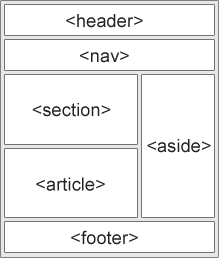
<article><aside><details><figcaption><figure><footer><header><main><mark><nav><section><summary><time>
1. hidden and block in Responsive Design
class="lg:hidden ...
class="hidden lg:block ..."
 <div class="lg:hidden mx-0 px-1 text-xs sm:text-sm md:text-base lg:text-xl  bg-red-900 sm:bg-yellow-500 md:bg-white md:text-green-700 lg:bg-green-400 lg:text-black xl:bg-blue-600 text-white">
Lorem ipsum, dolor sit amet consectetur adipisicing elit. Deserunt soluta id obcaecati, ut esse assumenda dolorum sequi! Eaque sed harum dolore? Impedit, vitae?
</div>
<div class="hidden lg:block mx-0 px-1 text-xs sm:text-sm md:text-base lg:text-xl  bg-red-900 sm:bg-yellow-500 md:bg-white md:text-green-700 lg:bg-green-400 lg:text-black xl:bg-blue-600 text-white">
Hey you are on a large screen? Check this out!
</div>
Space Between
- Utilities for controlling the space between child elements.
space-x-1

space-y-0.5
⚠️ Note: Add vertical space between children Control the vertical space between elements using the space-y-{amount} utilities.
- Vertical align children मे अच्छे से WORK करेगा
  - 🔴 Horizontal के लिए first element child को blank छोर दे ।

<ul class="flex space-x-3 space-y-4">
    <1i></1i>   // ✅✅
    <1i>Home</1i>
    <1i>About</1i>
    <1i>Services</1i>
    <1i>Contact</1i>
</ul>
[Customizing Tailwind CSS using tailwind.config.js file: Tailwind Tutorial #12
](https://www.codewithharry.com/videos/tailwind-course-in-hindi-12/)
CWH Notes Link ⤴️
Topic hover focus active and other states
CWH Notes - hover, focus, active, ...
(1) What is the difference between :focus and :active?
:focus and :active are two different states.
:focus represents the state when the element is currently selected to receive input and
Tabbutton press करने पे changes observe होगा ।
:active represents the state when the element is currently being activated by the user.
- Mouse से click करने पे changes observe होगा ।
For example let's say we have a <button>. The <button> will not have any state to begin with. It just exists. If we use Tab to give "focus" to the <button>, it now enters its :focus state. If you then click (or press space), you then make the button enter its (:active) state.
On that note, when you click on an element, you give it focus, which also cultivates the illusion that :focus and :active are the same. They are not the same. When clicked the button is in :focus:active state.